


iWant
2.62.10K Reviews
App Specs
- Version
- 26.08.10-1
- Updated On
- License
- Free
- Downloads
- 10,000,000+
- Developer
- ABS-CBN
- Categories
- Entertainment
- Platform
- Android
Screenshots
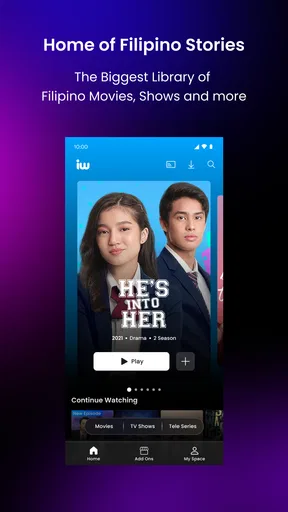
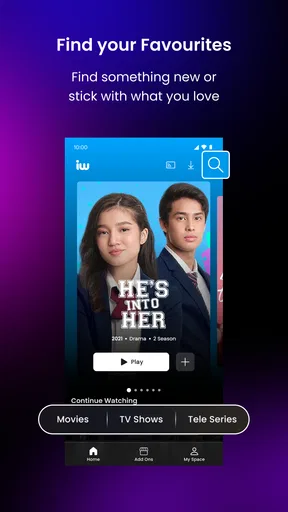
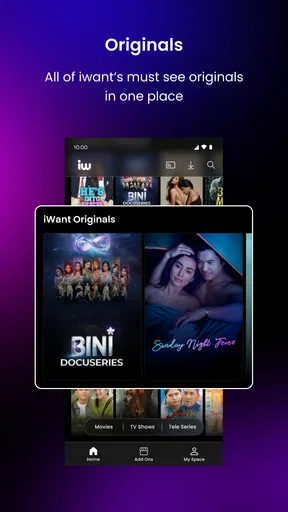
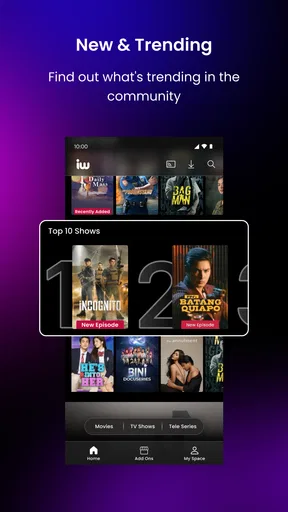
 Analysis by AppCompare
I approached iWant as an everyday entertainment app rather than treating it like a simple video shortcut. Developed by ABS-CBN, it is aimed at people who want Filipino-focused viewing in one place, and its store summary, “Home of Filipino Feels,” gives a good sense of its identity. My impression is that the app can be a convenient companion for Filipino shows and entertainment, but the experience depends heavily on how smoothly the app, account, device, and internet connection work together.
That distinction matters because a disappointing session is not always caused by the app itself. A video that refuses to start, a screen that keeps loading, or a sign-in process that seems stuck can come from several different points in the setup. I found it more useful to approach iWant methodically instead of immediately reinstalling it or assuming the service was unavailable.
Getting past the first points of friction
The first thing I would check is whether the phone or tablet meets the basic software requirement. iWant supports Android starting with version 7.0, so an older device may be the real obstacle before the app even gets a fair test. On a compatible device, I would also leave enough free storage for normal app operation and make sure the operating system has finished any pending updates. These are simple checks, but they prevent a lot of false diagnoses.
The app is free to install, which makes trying it relatively easy. That does not mean every part of the experience is automatically free: in-app purchases range from $0.49 to $234.99 per item. I would therefore read any purchase screen carefully before confirming anything, especially if more than one person uses the same phone or tablet. A free download and optional paid items are two different things, and keeping that distinction clear avoids an unpleasant surprise.
On a fresh installation, I prefer to begin with a stable Wi-Fi connection. This is not because mobile data cannot work, but because a steady home connection makes it easier to tell whether a problem comes from the app or from the network. If the app opens normally on Wi-Fi but struggles on mobile data, the next step is to inspect the phone’s data settings rather than repeatedly clearing the app.
It is also worth checking the device’s date and time settings. An incorrect clock can interfere with sign-in and secure connections in many mobile services. I would set the phone to update its time automatically, close iWant completely, and then open it again. This is a small troubleshooting step that is easy to overlook because the rest of the phone may appear to work normally.
Another useful habit is to test one simple action at a time. Open the app, wait for the main screen to load, and try a single title or section instead of rapidly tapping several controls. When an app is still loading, repeated taps can make the interface feel more broken than it really is. Giving each screen a moment also helps identify whether the issue affects the whole service or only one piece of content.
Worth Reading Before You Choose

EA SPORTS FC Mobile 26 Is a Bigger Football Game, but It Takes Time

Flipboard Shows What News Apps Must Do Beyond the Feed

Switching to Android Auto Means Rethinking Your Driving Routine

Google Calendar Makes a Crowded Week Easier to Manage

Ludo King Makes the Most of the Minutes Between Plans

Baby Panda World Brings Quick Play to Modern Phones, but Its Game Library Feels Busy
What I would verify before blaming the connection
If iWant opens but playback does not begin, I would first try another title. A single item failing does not necessarily mean the whole application is down. If another title plays, the issue is more likely limited to that particular selection, its availability, or the way the first request was handled. If nothing plays, then I would move on to the connection and app state.
I would also pause other heavy internet activity in the home, such as large downloads or several simultaneous streams. Even a fast connection can feel unreliable when many devices compete for it. Restarting the router can help, but I would not do that as the first and only response. A quick comparison with another app that uses video gives a much clearer clue: if several services struggle, iWant may simply be receiving the same weak connection.
On a phone, switching briefly between Wi-Fi and mobile data can be a practical diagnostic test. I would do this only if the mobile plan allows it and I know data use will not be a problem. If one network works and the other does not, the result points toward network routing, signal strength, or a local connection setting rather than a damaged installation.
When the app feels slow after being left open for a long time, I would close it from the recent-apps screen and relaunch it. This is different from deleting data: it gives the app a clean start without immediately removing stored sign-in information or other local settings. If that does not help, restarting the device is a sensible next step because it resets temporary system processes as well.
A safer way to recover a stalled session
My preferred recovery order is deliberately conservative. I close and reopen iWant, test a different connection, and try a different title. Only after those steps would I consider clearing the app cache through the device settings. Clearing cached files can resolve a damaged temporary download, but it should not be confused with clearing all app data. The latter may remove local session information and force another sign-in, so I would use it only when I am comfortable entering the account details again.
Reinstalling is another last-resort step, not my default solution. It can help when the installed files are damaged or an update did not complete correctly, but it also creates extra work and may remove local preferences. Before uninstalling, I would make sure I know the account credentials and that I am installing from the official app marketplace. This is especially important for an entertainment app that may be used casually; losing access because of an avoidable sign-in problem is frustrating.
If an update is available, I would install it before attempting more drastic fixes. The current Android version is 26.08.10-1, and keeping the app current is generally the cleanest way to benefit from bug fixes or compatibility changes. I would still avoid assuming that an update will solve every playback problem. Updates improve the app side, while network quality, device performance, and account state remain separate factors.
One practical workflow is to note exactly where the failure occurs. Does the app fail before the home screen, during sign-in, when opening a title, or only after playback begins? That detail is much more useful than saying that “the app does not work.” It also prevents random troubleshooting. A sign-in problem calls for account and time checks; buffering points more toward the connection; a crash during launch suggests the installation or device environment.
When the phone or network is the real problem
Older hardware can make a streaming-focused entertainment app feel unreliable even when the software is installed correctly. Limited memory, a crowded storage drive, or many background apps can cause slow loading and sudden restarts. I would close unused apps, free some storage, and restart the device before treating iWant as defective. If the same phone struggles with several demanding apps, changing phones or reducing background load may help more than reinstalling one application.
Network conditions can also change from room to room. A device close to the router may play normally while one farther away buffers. Testing in the same location where other video services work well helps isolate this. I would not judge the app from a single weak-signal corner of the house, particularly if the problem disappears near the router.
There is another easy-to-miss issue: battery-saving or data-saving modes may restrict background activity or network access. I would inspect those settings if the app loads inconsistently, especially after the phone has been idle. I would not turn off every battery or privacy protection permanently; instead, I would test whether one restriction is affecting the session and then keep the least disruptive configuration.
Storage pressure deserves attention too. A phone that is nearly full may behave unpredictably, including slow app launches and failed temporary files. Removing unused downloads, photographs, or old applications can improve the general device experience. This is a better long-term fix than repeatedly clearing iWant’s data if the entire phone is running out of room.
For households with several viewers, the practical question is not only whether iWant works, but whether the connection can support everyone at once. If one person is watching elsewhere, another is gaming online, and a third is making a video call, the available bandwidth may fluctuate. Testing iWant during a quieter period gives a fairer impression of its playback behavior.
How I would use it in a normal day
A realistic use case is an evening when I want Filipino entertainment without searching across several unrelated services. I would open iWant, browse for something that suits the time I have, and start with a single title rather than building an elaborate plan around uninterrupted viewing. If playback begins smoothly, the app serves that casual purpose well: it keeps the discovery process centered on Filipino content instead of making me jump between general entertainment catalogs.
For a family member who follows ABS-CBN entertainment, the app’s focus is its clearest reason to try it. The developer is not incidental here; ABS-CBN gives the service a specific cultural and content identity. Someone looking for a broad international catalog may find a larger general streaming platform more suitable, while someone specifically interested in Filipino viewing may appreciate the narrower focus.
I would use it differently on a small phone than on a larger screen. On a phone, it is convenient for short sessions, travel, or watching while waiting. On a tablet, the viewing experience can feel more comfortable for longer programs, assuming the device handles the app well. I would be cautious about treating the app as a replacement for every form of television viewing, because the best setup depends on screen size, connection stability, and how much time I plan to spend watching.
The Teen content rating is another reason I would not hand the app to a younger child without supervision. A teen rating does not mean every item will suit every family, so parents should remain involved in deciding what is appropriate. That is particularly relevant when the app is shared on a household device and children can browse independently.
For paid items, I would make the purchase decision only after checking what is being offered on the specific screen. The price range is wide enough that casual tapping is not a good habit. I would also confirm which account is signed in and whether purchase authentication is enabled on the device. Those steps are more useful than assuming that the free installation covers every viewing option.
Where it fits beside other entertainment choices
Compared with a general streaming platform, iWant has a more defined purpose. Broad services are usually better when I want to move between international films, imported series, documentaries, and unrelated genres. iWant makes more sense when Filipino entertainment is the main reason I am opening the app. That specialization can save browsing time for the right audience, even if it feels limiting to someone who wants a single universal catalog.
Compared with watching clips through a general video platform, a dedicated entertainment app can feel more organized around its own viewing experience. The trade-off is that a general platform may be easier for quick searches, informal clips, and content from many creators. I would choose iWant when I already know I want its Filipino-focused offering, and a general video app when I am simply looking for something random to watch.
Compared with traditional television, the app gives me more control over when I begin a session. That is useful for busy schedules, but it also makes the experience more dependent on the phone, software, account, and network. Television can be simpler when I want to switch on a screen and avoid troubleshooting. iWant is the better fit when on-demand access and mobile convenience matter more than absolute simplicity.
The average rating of 2.6 from around 77 thousand ratings suggests that the experience is not consistently smooth for everyone. I would treat that as a reason to test the app on my own device rather than as an automatic rejection. The service has passed ten million installs, so it clearly attracts a substantial audience, but popularity alone does not guarantee that every phone, network, or viewing expectation will match.
Who should try it, and who should skip it
I would recommend trying iWant if Filipino entertainment is central to what you watch, you use a reasonably current Android device, and you are comfortable doing a few basic checks when playback misbehaves. The free installation lowers the barrier to testing it, while the ABS-CBN connection gives the app a clear identity instead of making it feel like another undifferentiated video catalog.
I would be more hesitant to recommend it to someone who wants one app for every kind of entertainment. A broader service may offer a better balance for that person, especially if Filipino content is only an occasional interest. I would also suggest skipping it for a young child using a shared device without supervision because of the Teen rating and the presence of in-app purchases.
People with unreliable internet should set realistic expectations. No app can turn an unstable connection into dependable playback, and repeated reinstallations will not fix weak signal or crowded bandwidth. In that situation, an offline-friendly option or traditional television may be less frustrating, depending on the viewing goal.
Finally, users who dislike account recovery, purchase checks, or device troubleshooting may prefer a simpler viewing method. iWant is not necessarily difficult, but it rewards a little patience. The most effective approach is to identify the exact point of failure, test the connection and device separately, and only then reset the installation.
My practical verdict
iWant is a focused entertainment app with a clear appeal: it puts Filipino viewing at the center and is available as a free Android download for compatible devices. I like that its purpose is easy to understand, and I can see it fitting naturally into a Filipino household, a short mobile viewing session, or an evening when I want something more culturally specific than a general streaming catalog.
My reservation is consistency. The modest average rating, the possibility of paid items, and the number of variables involved in playback mean I would not recommend installing it without checking the basics first. A stable connection, enough device storage, current software, and careful attention to sign-in and purchase screens make a noticeable difference.
My honest recommendation is to try iWant when its Filipino-focused catalog is the reason you are watching, not simply because you want another streaming app. Give it a fair test on your main device, use the recovery steps above before deleting data, and judge it after separating app problems from network or hardware problems. For the right viewer, that focused identity is valuable; for someone seeking a universal entertainment service with minimal friction, another option will probably be the better everyday choice.
Pros
- Simple interface makes browsing and searching content easy.
- Supports quick access to frequently watched videos.
- Content categories help users discover new material.
- Playback generally starts quickly on a stable connection.
- Available on mobile devices for convenient viewing anywhere.
Cons
- Content availability may vary depending on your region.
- Some videos may contain intrusive advertisements.
- Video quality can depend heavily on network performance.
- The app may request permissions users consider unnecessary.
- Updates and support quality may be inconsistent over time.
FAQs for iWant
What is iWant and what can I watch on the app?
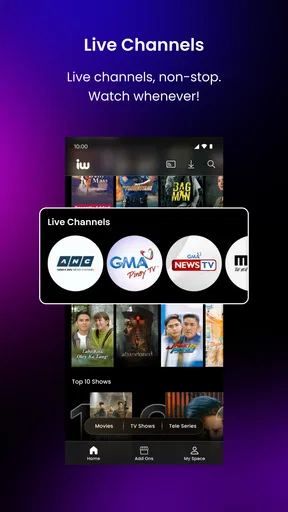
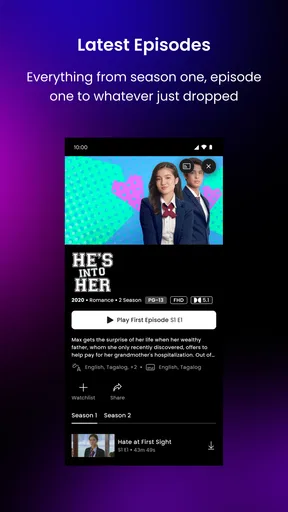
iWant is a streaming platform focused on Filipino entertainment, offering movies, television series, original productions, live channels, news, and other on-demand content. Its catalog may include local dramas, comedy shows, reality programs, documentaries, and selected international titles. The exact selection can change over time and may depend on your country, subscription plan, and current licensing agreements.
Is iWant free to download and use?
The iWant app is generally free to download, but not all content is necessarily available without payment. Some programs may be supported by advertisements, while premium movies, exclusive originals, or additional features can require a subscription or another paid access option. Before subscribing, check the pricing, billing period, available plans, and whether a free trial is offered in your region.
Does iWant work on Android and iPhone devices?
iWant is designed for mobile use and is commonly available on compatible Android and iOS devices through their official app stores. Performance can vary depending on your phone or tablet model, operating-system version, available storage, and internet connection. Downloading the app from the official Google Play Store or Apple App Store is recommended to receive legitimate updates and avoid unsafe third-party files.
Can I watch iWant content offline?
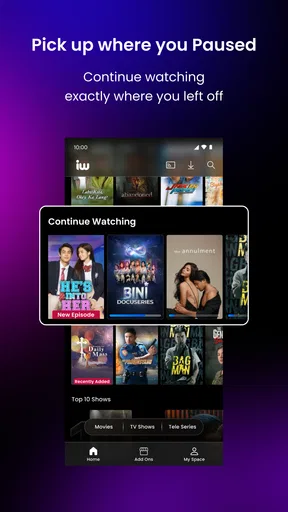
Offline viewing may be available for selected iWant programs, although download support can depend on the title, your subscription, device, and regional restrictions. When the feature is offered, downloaded videos are normally watched inside the app rather than exported as ordinary video files. You may also need to reconnect periodically so the app can verify your access and download licenses.
Does iWant require an account, and is the content available everywhere?
An account may be required to access personalized features, premium programming, subscriptions, or viewing progress across devices. iWant content is not necessarily available in every country because streaming rights and service availability differ by region. If you travel or use a different network, certain programs, live channels, or payment options may disappear. Review the app’s current regional terms before downloading or subscribing.


